

How To Clean Roland Print Head
Procedure
- Remove any media.
- Remove the media clamps.
- Press [FUNCTION].
- Press [▼], then [▶].
- Press [▼] several times to display the screen shown below.
- Press [ENTER].
When the media clamp removal message is displayed, press [ENTER] again. After "NOW PROCESSING.." is displayed, the screen shown below appears.
Also, the print head moves to the left end of the platen.

IMPORTANT :
Do not press [ENTER] at this stage. Press the [ENTER] key after cleaning is complete. If you press the [ENTER] key at this stage, wait for the screen to change as shown in the following figure, and then press the [ENTER] key again.


- Open the front cover.
- Open the left covers (top and bottom).
- Touch the location shown in the figure to discharge any static electricity.
- Remove the cut rail.
- Move the print-head carriage to the left end.
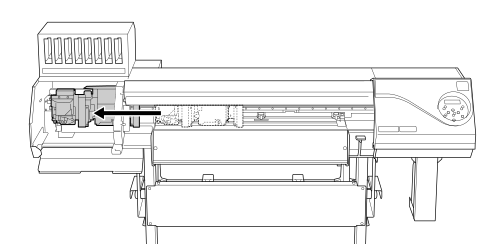
Move the print-head carriage by hand.
CAUTION :
When moving the print-head carriage by hand, be sure to hold the specified position.
Moving it by holding positions other than those specified may deform and damage the cover.
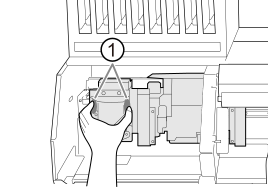
 : Position to hold with your hand
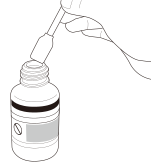
 - Apply a large amount of cleaning liquid to the cleaning stick.
IMPORTANT :
Be sure to use one of the included cleaning sticks.
- Clean the locations shown in the following figure.
Be especially careful to clean away any fibrous dust (lint).
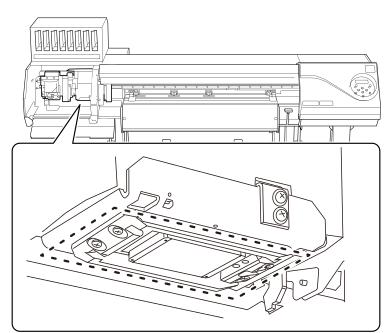
- Use the wide surface of the cleaning stick to wipe off the left side. Then, use the opposite surface (which is not dirty) to wipe off the right side.
- Stand the cleaning stick upright and wipe off the left side. Then, use the opposite surface to wipe off the right side.
- Use the wide surface of the cleaning stick to wipe away any dirt from the area shown in the figure.
If this area has any ink or cleaning liquid that appears likely to drip, use a dry cloth that is not fluffy to gently wipe away the ink or cleaning liquid.
- When you have finished cleaning, move the print-head carriage to above the platen.
Move the print-head carriage by hand.
CAUTION :
When moving the print-head carriage by hand, be sure to hold the specified position.
Moving it by holding positions other than those specified may deform and damage the cover.
: Position to hold with your hand - Attach the cut rail.
- When you have finished cleaning, close the left covers (top and bottom).
How To Clean Roland Print Head
Source: https://downloadcenter.rolanddg.com/contents/manuals/LEC2-300_USE_EN_R2/topic/cManualCleaningMethod.html
Posted by: burnettspas1983.blogspot.com
0 Response to "How To Clean Roland Print Head"
Post a Comment